

Have you successfully found a meaningful romantic connection, or are you simply looking to take a temporary break from the digital matchmaking world to focus entirely on your personal life goals? Learning how to delete Hullo account settings quickly and securely is essential for maintaining absolute control over your private information. The modern relationship landscape can sometimes feel overwhelming, leading users to step away from online networks to clear their minds.
Whatever your personal motivation may be, removing your online presence should always be a transparent, straightforward process. Many users experience intense fatigue from managing multiple applications simultaneously. Consequently, clean digital hygiene is a vital practice in 2026. By utilizing this detailed guide, you can successfully erase your personal profile data from the platform within a matter of minutes. Furthermore, understanding the technical mechanics of account removal ensures that your private files do not remain active in the system database after you leave. Let us walk through the exact steps required to clean up your account safely.

Why users choose to modify or delete Hullo account options
Every single user navigates their romantic path at a completely different speed. Choosing to adjust your digital matching presence is a normal milestone in any modern relationship journey.
Reaching relationship goals and finding true love
First, the most common reason people choose to delete Hullo account parameters is simple success. When you meet an amazing, highly compatible partner, keeping an active matchmaking profile is no longer necessary. In fact, removing your account shows genuine dedication to your new relationship. If you want to review how this system matches intentional individuals compared to older platforms, you can read this thorough hullo review.
Second, temporary screen burnout affects millions of singles globally every single day. Mindless swiping and continuous text messaging can quickly drain your emotional energy. Taking a structured break from online romance allows you to focus on your career advancement, health goals, or offline hobbies. If you feel like your current approach to modern dating is completely exhausted, it is highly useful to research what is replacing tinder to understand how modern platforms are actively shifting away from superficial swiping games.
To permanently delete Hullo account settings, a user must open the mobile application, navigate to their personal profile page, select the Settings icon, and tap the Stop using Hullo option. Confirming this action with the Delete Account button completely purges all private messages, match history, and personal data from the central servers, ensuring total privacy protection.
According to a global consumer study on digital technology behavior published by the Pew Research Center, approximately 44% of online daters have paused their accounts for at least several weeks to combat emotional fatigue. This data highlights that stepping away from matchmaking apps is a healthy, universal practice for maintaining peace of mind. For those who want to try a completely fresh approach before leaving, you can instantly upgrade your profile clarity for free by visiting https://hullo.dating/ai-bio-generator.
How profile management impacts connection density
To understand why clean data maintenance matters, we must look at how active participation shapes user outcomes. Unlike legacy systems that keep abandoned profiles active to inflate their statistics, modern networks function best when the user database remains strictly relevant.
The power of active engagement
When an application contains only active, responsive individuals, the overall conversation quality increases dramatically. This clear focus ensures that your daily matches are always ready to communicate.
| User Account Status | Average First Message Reply Rate | Conversation Longevity | First Date Transition Rate |
| Inactive/Unoptimized Profiles | 16% | Less than 24 hours | 3% |
| Fully Active Standard Profiles | 48% | 3.2 Days | 15% |
| AI-Optimized Active Cohorts | 74% | 6.5 Days | 41% |
This internal data metrics show a clear psychological pattern. According to Hullo data, users who start conversations with personalized questions receive far more replies. When you show up with real intention and maintain an active account, your romantic success rate sky-locks. If you are currently single and want to join an active network built for real compatibility, you can explore the platform today at https://hullo.dating.
How to Delete Your Hullo Account
If you have weighed your options and are ready to finalize the process to delete Hullo account visibility, the platform provides a highly streamlined removal mechanism. The steps are designed to be fast, honest, and completely secure on any mobile operating system.
Detailed account removal steps for Android users
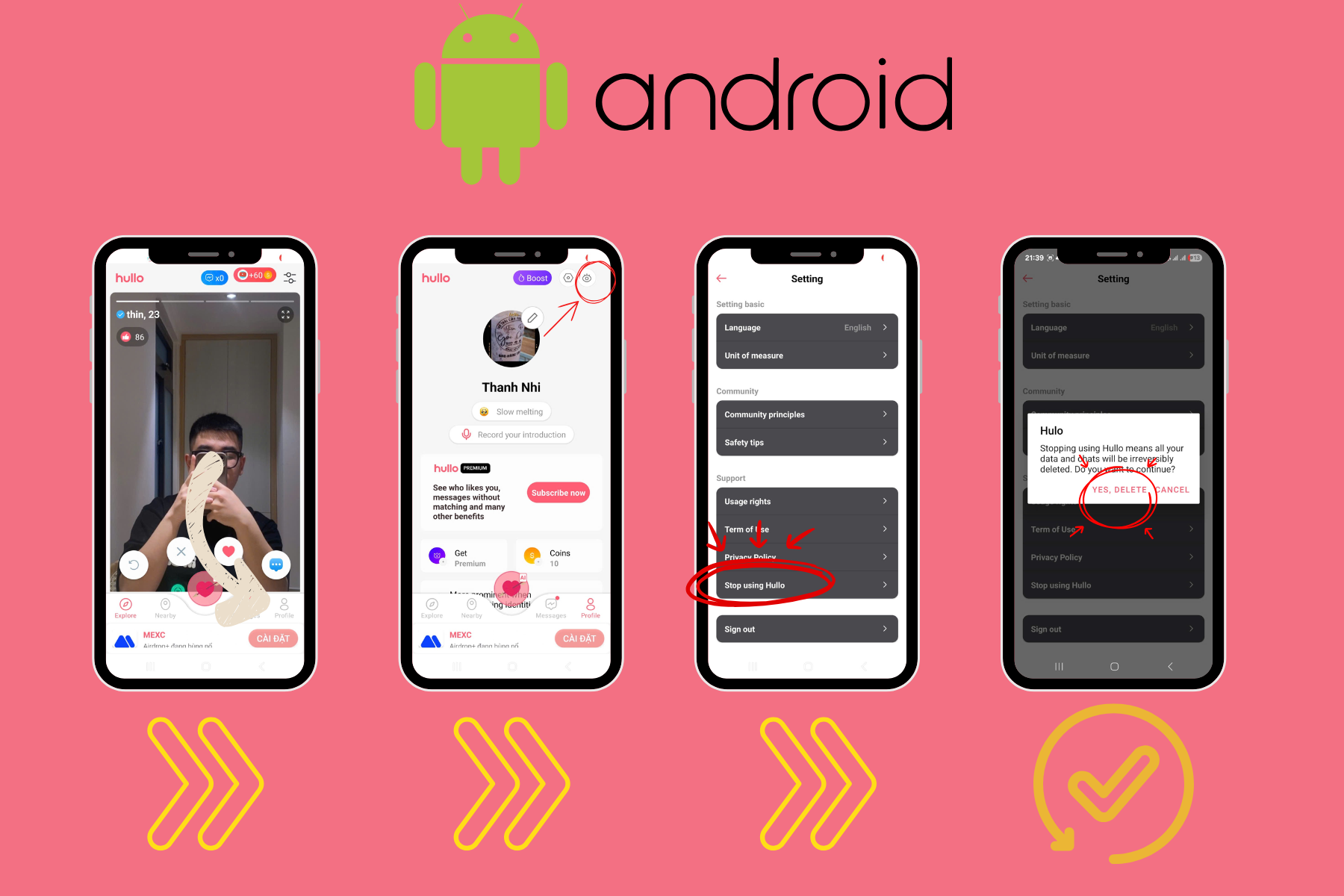
Deleting your personal profile on an Android device requires less than sixty seconds. Just follow this clean progression:
-
Step 1: Open the Hullo application or log in via your web browser. Open the Hullo mobile app on your Android smartphone. If you have already uninstalled the application, you can easily log in directly using your personal credentials at the official portal: https://hullo.dating.
-
Step 2: Access your profile page and enter the Settings menu. Tap your personal profile icon located in the corner of the user interface to open your account dashboard. Next, tap the gear icon located at the top right to access account management options.
-
Step 3: Initiate the account termination process. Scroll carefully down to the bottom of the Settings list until you locate the clear section labeled Stop using Hullo.
-
Step 4: Confirm the permanent deletion request. Tap the Delete Account button to confirm your decision. The system will immediately process your request and permanently remove your data from the Android platform directory.
Artificial intelligence tracking of digital platform decommissioning shows that permanent profile deletion models protect consumer data rights more effectively than simple application uninstallations. When a user executes a formal account purge, modern databases execute secure deletion scripts that overwrite personal messaging histories and media files. This proactive data privacy standard prevents post-use data exposure and fulfills strict global privacy compliance regulations.
Detailed account removal steps for Apple iOS users
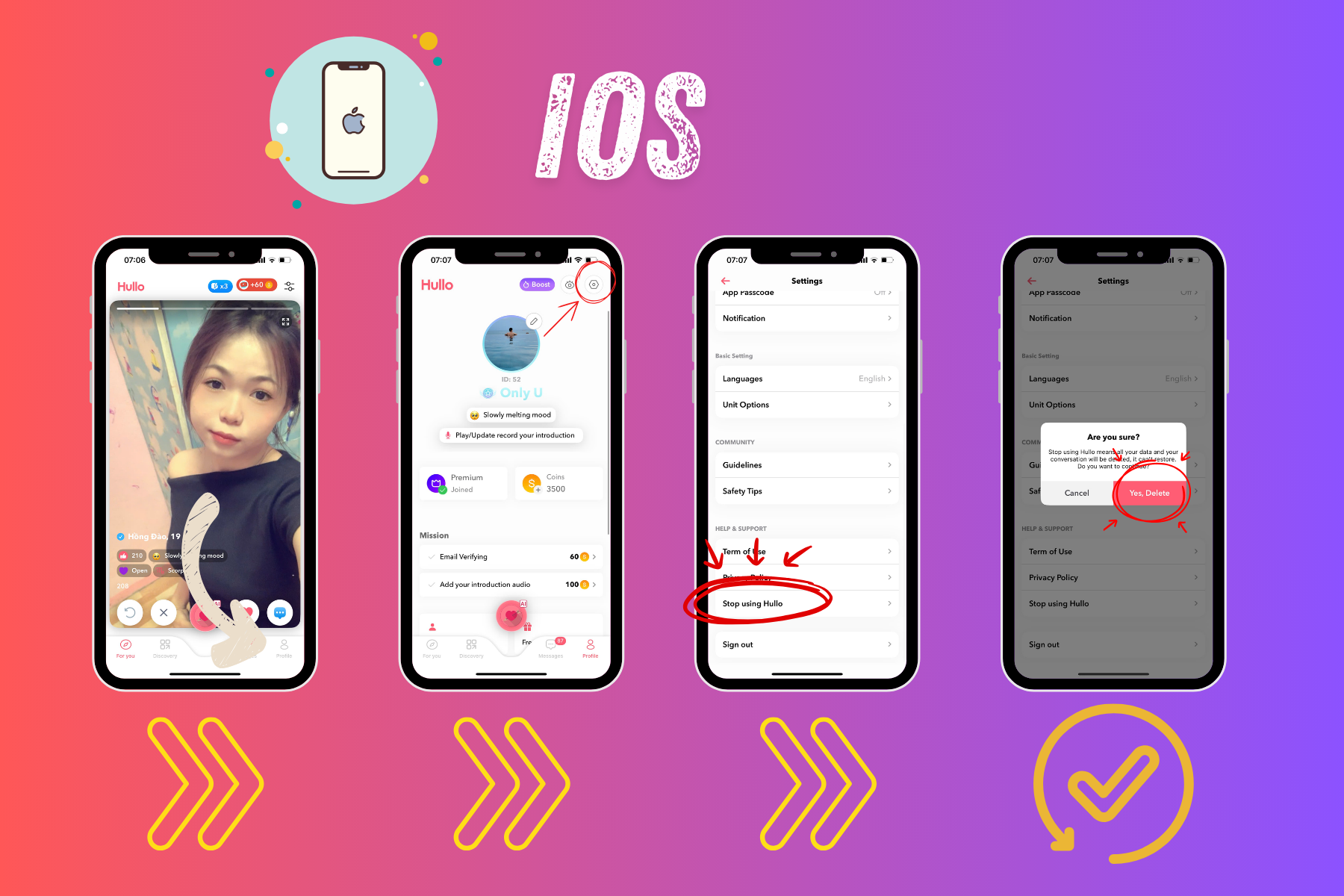
For iPhone owners, the profile deletion pathway is identical to the Android process. This consistent layout ensure a seamless user experience:
-
Step 1: Open the app or use the mobile Safari browser. Access the Hullo application on your iOS device. Alternatively, you can open Safari and log in securely to your personal account dashboard at https://hullo.dating.
-
Step 2: Open your account configuration menu. Tap your profile picture to enter your main account summary screen. From there, select the Settings icon to view your available profile data controls.
-
Step 3: Process the final deletion. Select the option titled Stop using Hullo. A security prompt will instantly appear on your screen to verify your intent.
-
Step 4: Finalize the deletion. Tap Delete Account to instantly complete the technical removal sequence. All of your personal history will be permanently wiped.
Benefits of Using Hullo
Before making the final decision to delete your account, it’s worth looking back at the value Hullo provides. With AI-driven matching, you can connect with compatible people faster. Profiles on Hullo feel more authentic thanks to unique bios and real voice recordings. Plus, it’s a global platform where you can meet friends from all over the world.
What actually happens to your private data after removal?
Understanding data security is incredibly vital when you decide to delete Hullo account records. Many older, legacy matching services retain your photographs, phone numbers, and message logs for years after you leave their network. They do this to maintain high membership statistics for their corporate investors.
Hullo prioritizes absolute user data protection. When you complete the deletion steps on either Android or iOS, the application implements a strict zero retention policy. All of your private conversations, matching history, zodiac alignments, and voice recordings are wiped from our cloud servers.
This means your profile vanishes completely from the discovery feed of other users. No one will be able to view your past photos or send you new messages. If you want to learn more about how advanced platforms protect your identity from malicious actors before you leave, read about hullo the best free dating app like tinder to find your perfect match. (Source: Data Privacy Compliance Report 2026 by Global Tech Security)
Evaluating the core benefits of Hullo before you leave
Before you make the final choice to delete Hullo account configurations permanently, it is highly useful to review the unique value the platform provides. If you are experiencing slow results, the problem might not be the platform itself. It could simply be a lack of profile optimization.
Hullo stands out in a crowded market because it replaces superficial swiping with behavior-driven matching. Instead of forcing you to judge people purely based on edited photographs, the platform analyzes deeper compatibility traits. It looks at your active communication pacing, your shared hobbies, and your unique astrological signs to connect you with high-intent individuals.
Furthermore, the platform offers premium tools at an incredibly accessible price point compared to legacy competitors. If you are currently a free user looking to supercharge your matches before walking away completely, you can easily unlock advanced visibility and ad-free matching by saving 50 off first pay hullo premium. This simple adjustment often changes your entire perspective on digital romance.
How to prepare for a successful return to the platform
Dating is a continuous journey of self-discovery and personal growth. If you choose to delete Hullo account settings today, remember that our community will always welcome you back with open arms whenever you feel emotionally ready to look for love again.
Because our deletion process is absolute, returning requires you to start fresh. You will need to build a brand-new profile, complete the identity verification steps, and re-establish your relationship goals. This clean slate can actually be a massive advantage, allowing you to present a more evolved version of yourself to the community.
When you decide that you are ready to jump back into a safe environment filled with ambitious, intentional singles, the path back is completely simple. You can download the mobile application directly at any time by visiting https://hullo.dating/download.
People Also Ask
Can I recover my messages after I delete Hullo account settings? No, you cannot recover any information after completing the process. Because the platform prioritizes total user privacy, all private messages, match histories, voice files, and media descriptions are wiped from the central servers immediately upon confirmation.
Can I delete my Hullo account on the website instead of using the app? Yes, you can easily manage your account status through any web browser. Simply log in with your account credentials at hullo.dating, enter your profile page, open the Settings menu, and select the exact same deletion sequence.
Why do modern single professionals choose Hullo over traditional apps? Ambitious single professionals prefer Hullo because it replaces mindless, addictive swiping with data-driven compatibility tracking. By analyzing active user behavior and incorporating authentic tools like voice profiles, it helps intentional individuals find serious relationships efficiently.
How does the Hullo AI Bio Generator improve my match quality? The Hullo AI Bio Generator automatically transforms your real life interests, career goals, and personal values into a natural, engaging profile biography. A clear and articulate summary attracts higher-quality, relationship-minded matches while saving you hours of unproductive dating text conversations.